Showing posts with label linux. Show all posts

Thursday, May 31, 2007

Linux Embraces Mac-Like Dock

Awn.png

Linux only: Free open-source app Awn is an application dock for Linux.

Awn allows you to setup custom launchers exactly the same way it's done on the Mac OS X Dock. Additionally, Awn supports the drag and drop method of adding launchers, and it even tracks your open windows. The homepage describes the features of Awn very concisely:

Clicking an icon switches to that window, clicking again will minimize the window. Right-clicking will bring up a menu exactly like that of what you see on the window-list, allowing you to maximize, minimize, close, and resize the window. Dragging something on top of an icon will activate that window. Visually (and quite attractively) responds to 'needs attention' & 'urgent' events. Can show windows from the entire viewport, or just the visible viewport.

Ubuntu users should closely follow the installation instructions on the Awn homepage. Users of other Linux distros can find specific instructions on the homepage, also. Awn is a free download for Linux and requires Affinity.

Wednesday, May 23, 2007

What to Expect from Dell's Ubuntu Machines (Hint: It's Fantastic for Linux Users Who Don't Buy Dell)


Now that Dell's on the verge of shipping Ubuntu-installed computers, potential Linux converters could have some questions as to what they're getting when they buy the package. Dell's got some answers.

First off, Dell's going to be shipping the default install of Ubuntu. However, when it comes to drivers, they're going to be supporting a subset of other OS installations, and using some closed source drivers when it's necessary—as in, when there's no equivalent open source version. For you, this means better compatibility.

However, the fact that Dell is entering this Linux game means they're going to push people hard to make drivers compatible and/or open source. Fantastic for Linux users.

As for peripherals, Dell is going to set up a wiki page so you can see which ones are supported and what problems they have. This includes printers, which they recommend you buy from Dell (shocker).

For other hardware, Dell is working on adding support in conjunction with other manufacturers, which means it's actually great news for Linux fans since a big manufacturer like Dell will lean hard on peripheral makers to provide Linux compatibility.

The bad news is they're not going to support any "proprietary audio or video codecs" like MPEG 1/2/3/4, WMA, WMV, DVD, Quicktime and others. If you want those, you're going to have to install them yourself.

Ubuntu 7.04 Offering--Technical Details [Direct2Dell]

Found on Gizmodo

Thursday, May 10, 2007

Leapin' Linux, Let's Make the Jump, Sheep!

linuxlead.jpg

F%&$ Windows, and f%&$ the Mac, too. Maximum PC shows you how to make the jump to Linux from start to finish, and shows you how to stay there once you've abandoned all those other PC and Mac sheep to go your own open-source way.

Let's all get the hell out of these mainstream operating systems and get into the real stuff. How about we dig into that latest Ubuntu Feisty Fawn, easy as pie to use, and let's slather on a heaping helping of the 3D Beryl desktop compositing engine on top to keep things all prettied up?

But, but ...

There's even a way to run Windows on Linux using Parallels, so the excuses are getting thinner and thinner for staying with your white-bread religion. Sure, there's plenty of help on the Interwebs for Linux and Ubuntu installation, but none as to-the-point as this.

And hey, there's Firefox on Linux, too, so the Giz will still look just about the same. Get thee hence, all we like sheep who have gone astray. Every one to his own way. Live your own life! Get down to it.

You Can Switch to Linux! [Maximum PC]

Tuesday, May 01, 2007

Dell Goes Ubuntu

It seems that the wildly popular linux variant will sign a deal to get distributed and supported on Dell PC’s.

Ubuntu senior support engineer Fabian Rodriguez wrote, “Many people have been involved in this and I can only say I am excited to be a tiny small part of it: Ubuntu will be officially supported on Dell computers. Any other details will come on www.ubuntu.com, check it for the official press release

Although nothing has been formally announced, this deal seems finalized. Finally, this will allow you to buy a PC and run the operating system of your choice (with a little hackery you can use the MacOS too) without paying the dreaded “Windows Tax”.

found on Uneasy Silence

This is BIG news for the Linux community!

Friday, March 30, 2007

TurboLinux offer a Dev Kit for their Linux DAP


TurboLinux made the front page some time ago with their first DAP (MP3 player) running Linux. Now TurboLinux is moving further by offering a development kit for those who want to add features to their 100% Linux MP3 player! Very good!

found on akihabaranews.com

Monday, March 12, 2007

Beryl

Beryl Feature Spotlight


What is the Beryl Project?

Beryl is an OpenGL accelerated desktop that seeks to provide a free, open source desktop experience to the community that reflects the wishes of the users. Above all else, the project seeks to listen to and respond to the requests of the user base.

Beryl is a combined window manager and composite manager written in C using OpenGL to provide acceleration. It is designed to be highly flexible, extensible, and portable, all the while keeping in mind that the users know how they want their desktops to act better than we do. With Beryl the rather esoteric concept of the computer desktop is brought down to a more human level, allowing for a more native and intuitive understanding of your workspace. To learn more about Beryl and its features visit our Feature Spotlight.

Beryl is a fork of the Compiz project, started by David Reveman of Novell. We continue to port new changes from compiz, and consider them essentially our upstream. Beryl could not have existed were it not for the heavy lifting done both server side by David and in creating compiz, which is the base on which all of our code is built, and which still comprises a large portion of our code, though this is likely to change as the 0.3.0/0.4.0 release cycle gets started.


Introduction

This is a feature spotlight to let you know about the many things Beryl will currently provide you with. Please note that this will include features both available and not available in Compiz, which Beryl was forked from. This is not a complete feature list, just a general overview of the features available in Beryl. A more complete feature list can be found on the weekly blog updates. There is also a new users guide here that contained a more complete howto for using beryl.

Scale Effect


Beryl

Scale out all your windows to get a thumbnail birds eye view of your desktop...

> OS X Expose Like Effect
Beryl allows users to activate the scale effect to find and switch between windows easily. Switching between windows using the scale effect is as easy as clicking on the thumbnail you want and Beryl will automatically pull up the selected window.
> Live Window Previews
As is the staple of all Beryl Effects, the windows show in the Scale effect are live previews. Movies continue to play, websites update. By right clicking on any given window, it will be zoomed back to full size for closer inspection.
> Drag and Drop Support
Dragging and dropping documents from folder to folder has never been easier. Overlapping windows are no longer an issue, just grab the document you wish to drag and drop, initiate scale with your mouse, and hover over the window you wish to drop it on. Easy...


Enhanced Switcher


Beryl

Alt+Tab switcher displays live preview thumbnails to make it easier to visually identify your applications...

> Improved Visual Identification
The new switcher replaces the old boring icon based switcher. Now providing the user with live previews of their windows. Switching between many windows of the same app with Alt+Tab no longer requires reading the sometimes ambiguous window name.
> Better Selectiong Control
By pressing Alt+Tab you can easily browse through windows on your current viewport. Or if you wish to browse through all windows on all desktops, pressing Ctrl+Alt+Tab will allow you to do so.
> See Only What You Want
If you wish, the new switcher can be configured to dim all windows but the active one making your entire desktop your switcher. If you switch to a window not on your current viewport, the cube will rotate to show you.


Desktop Cube


Beryl

Rotate around your desktop, really get a feel for where you are...

> Visualize Your Workspace
The human mind thinks very well in 3 dimensions, so why limit yourself to only two? Beryl can display your viewports as a cube, making it easier to organize your desktop. For the diehards though, the cube is unobtrusive as possible for these users.
> See Through The Clutter
Optionally the cube may be turned transparent to allow a user to see whats on the other side of the cube at all times. This feature is working but is planned to be in a future release.
> See Even More
For some the cube doesn't present enough information, only really showing the user one workspace at a time. In these situations it can be unfolded to show several viewports at once in a film strip style view by pressing Ctrl+Alt+Page Down.


Window Animations


Beryl

Window animations now clearly show you where your windows are going...

> See Whats Going On
Just like metacity before it, Beryl will show you exactly where your windows are going when you minimize them. Animations are also available for close, create, show, and window shading.
> Do It How You Want It
Beryl comes loaded with 10 different animations to choose from. You can have your windows simply fade in and out, or have them destroyed in a fiery inferno when they are closed. It is all up to you, you can even have it randomly select an animation each time.
> Shade Windows
Like many window managers before it, Beryl can shade windows to save on desktop space. Beryl comes with several animations for window shading, from a simple role up, to a accordian style folding. Once again, it is all up to you.


Window Effects


Beryl

Real time window effects are fun and useful...

> Transparency, Brightness, and Saturation
The transparency, brightness, and saturation of a window can easily be changed simply by right clicking on its title bar and setting it in the menu. It can also be set via mouse bindings.
> Gnome Terminal True Transparency
With Beryl providing a proper composited environment, Gnome Terminal can now use true transparency. That means you can see the windows below it instead of a copy of the wallpaper below it.
> Negative Windows
Like the negative of a film camera, the color values of windows can be inverted. This simple inversion makes it much easier to read text in many situations and is often quite easier on the eyes. Neg is as simple as Super+n.


Zoom In


Beryl

Zoom In, this screenshot is a full screen image! The screen itself is zoomed...

> Forget Your Reading Glasses
Websites keep using smaller and smaller text as screen resolutions keep getting bigger and bigger. Reading on the computer without binoculars is getting harder and harder, but Beryl can give you a virtual telescope!
> Zoomed Interaction
Beryl offers a proportional zoom that allows users to interact with their desktop while zoomed, working with tiny text, and tiny widgets was never easier. Super + Mouse Scroll is all it takes to help your eyes out.
> Future Hopes
Sometime in the future Beryl hopes to implement the GNOME Mag API, giving proper zoom support to the visually impaired. This combined with the current Neg plugin *inverts the color values on your screen* is a very potent combination.


Blur Effects


Beryl

Blur behind your terminal and get rid of those hard lines... (view full image to see blur)

> Eliminate the Clutter
One of the longstanding issues of transparent terminals been that reading the text over whatever was behind it became very difficult. Beryl allows users to blur what is behind their windows effectively removing hard lines that making reading difficult.
> Read Your Titlebar
Blur can also be used to blur what is behind your titlebar if your decorations are transparent. In fact, it can blur behind just about any transparent window, even those using a non-standard shape such as Cairo-Clock.
> Take It Easy GPU
Blur strives to be easier on the GPU by taking advantage of caching techniques and having many different shaders of variable strength to allow lower end cards to work more smoothly. Blur can even be used on cards without pixel shaders.


Window Decorations


Beryl

Beryl by design needs special window decorators, three are available...

> Emerald: True Beryl Themes
Emerald is a window decorator with minimal GTK requirements that enables fully transparent window decorations. It is one of the few window decorators that can be completely themed without ever touching an XML file.
> Heliodor: Metacity Themes
Heliodor provides exactly what the header suggests, metacity theme support. Heliodor is not yet feature complete but works on a basic level, and in the future will support basic transparency settings.
> Aquamarine: KWin Themes
Aquamarine provides support for KDE users who dont want to give up their KWin theme. Featuring full KWin theme support as well as direct integration with KControl, users don't have to know the difference.

Found on the Beryl website: http://www.beryl-project.org/

Friday, February 02, 2007

Goobuntu? True or False?


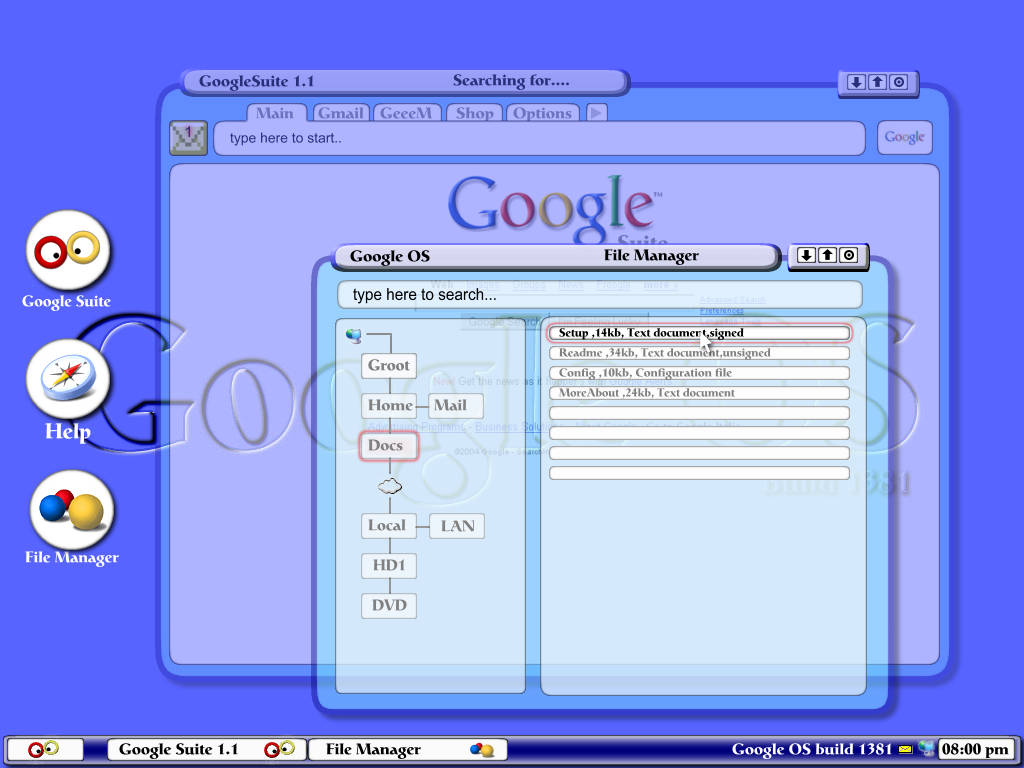
Last year around this time there was a lot of talk about a Google Operating System. There were several sites claiming confirmation from Google before there had been any confirmation and there were ample sites speculating about the look and features of the OS.


Now with at least five BIG new flavors of Linux, some internetters are disappointed that there's still no Goobuntu. Goobuntu does exist, just not how we'd like it to exist. Some Google employees are running a modified version of Linux on their work pc's and it's been modified to make their work easier. However, Google has not announced any plans to release the OS to the general public. Still, it does make some anxious young geeks like myself wonder.

This post is for keven, someone who commented on one of the other posts on here and asked about a Google OS. So for him and the rest of you, below you should find some more concept art that I found online, the one at the start of this post I actually made myself and while I would have liked to go more all out, frankly I'm not willing to spend more time on it.


Thursday, February 01, 2007

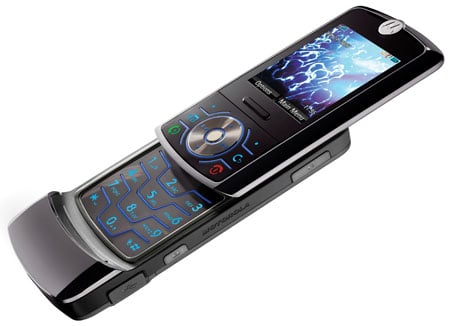
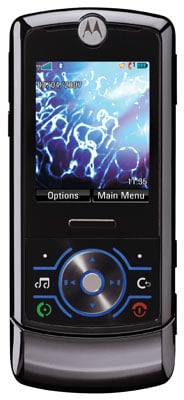
Motorola RIZR Z6 - First Phone to Run an "Open" OS


That's right folks! Motorola's RIZR Z6 runs Linux, Symbian OS or Windows on a single- rather than dual-processor architecture. Clearly Linux is making AMAZING progress!! ! This is really groundbreaking! For two reasons actually; the first being that Linux has moved onto mainstream mobile devices and the second being that these new non-microsoft phones are compatible with Windows computers - this shows that maybe microsoft is growing soft and accepting its defeat and so compensating by working closely with other companies to make different products compatible with their little OS monopoly.

Obvious pros of this phone are low cost and less power needed to run the OS and so it should run faster. My dad has this PDA and OMG it's got windows on it and its WAY slow! Speaking of pda's, rumor has it that Palmsource is adapting their Palm UI for mobile linux and that's not all! Nokia also has plans in store for linux! Seems everyone is jumping off the Windows ship. Damn, I have got to get a mac or something! lol

The RIZR Z6, demonstrated at the CES show and expected to ship by mid year. Motorola will also add a new, faster Linux user interface, called JUIX (pronounced "juice"). Alright so keep on the look out for this little toy and anyone who has it better tell everyone about it!

It's 2007 and Linux has arrived!

sweetcomputing - by Todd Robinson


"Linux has arrived"...that may sound funny to those who have been using Gnu/Linux for a number of years. But it has finally graduated from a "kit car" with a manual transmission to a full blown production vehicle with automatic everything. If you want, you can still tinker around in the garage or build a custom hot rod as a hobby. But you can also kick back in your limo and enjoy the ride.

The first month of 2007 is nearly complete, but all the hoopla in the computer industry has not been not around the release of Microsoft's Windows Vista. Instead several Gnu/Linux based desktop operating systems are outclassing the long time Desktop Giant, even before it's officially released to the general public.

In fact, Microsoft's Windows Vista, may not even be in the top 5 by the time it's available to the general public.

Lets take a look at the latest rivals:

1. Sabayon Linux has busted on the scene and has taken many - even in the Open Source world - by surprise, including us, here at Sweet! Computing. Graphically it is on par or maybe only slightly ahead of Vista. The desktop is based around a 3D cube that you can rotate from the outside with different Desktops on the 4 sides. And if that wasn't spectacular enough you can also adjust the settings to have yourself inside the cube, giving the impression that you are in a large room with huge application windows open on the walls...much like in the movie Minority Report where Tom Cruise uses his finger to operate the computer screen on the wall. And just like in the movie, you can even make the walls transparent. This wonderment of modern design is not really done by Sabayon Linux itself, but by an accelerated desktop window/composite manager known as "Beryl". Sabayon was among the first to incorporate Beryl so cleanly. In fact a main Beryl developer now uses Sabayon on his own computer.


2. PCLinuxOS is a desktop operating system dream come true. Thus far only the beta is out but we've checked it out and it's really sweet! The official release is expected in February. The new version also incorporates Beryl, as many of the newer Gnu/Linux releases will, for all the graphical goodies. For the first time PCLinuxOS will have an "official" release "PCLinuxOS 2007". No longer in beta, we are very excited for folks at PCLinuxOS.


3. Berry Linux may be the best "Unknown" desktop operating system to ever exist. With it's latest release, this virtually unknown powerhouse, leverages the spectacular graphical effects of Beryl, the latest of the most widely used desktop (K Desktop Environment, also used by both PCLinuxOS, and Sabayon), with one of the best supported Linux Distributions, Fedora Core 6, to achieve one of the top performing operating system distributions available today.

4 - 7. Ubuntu. With the release of 6.10 a few months ago the Ubuntu foursome (Ubuntu, Kubuntu, Xubuntu, and Edubuntu) were the front runners and arguably one of the best desktop operating systems at that time. Still one of the absolute best, but no longer in a class of their own, the Ubuntu desktops are among the best choices available.

CLICK HERE to read the original review of all of these operating systems and learn in detail what makes each of these SO COOL!

powered by performancing firefox